Protocol Fundamentals (Cambridge International A-Level Computer Science)
Need for protocols
What is a protocol?
-
A protocol is a set of rules that define how computers communicate over a network
-
They ensure that data is sent, received, and understood correctly by all devices, regardless of their manufacturer or operating system
-
Without protocols:
- Devices would not know how to structure or interpret data
- Data could be lost, corrupted, or misrouted
- Communication between different hardware and software systems would break down
-
Protocols are essential to guarantee:
- Reliable data transfer
- Consistent formatting and addressing
- Error checking and correction
- Security during transmission
-
Examples of protocols include:
- TCP, IP, HTTP, FTP, SMTP
Protocol stacks
-
The protocol stack is a way of organising network protocols into layers, where each layer is responsible for a specific function
- Each layer handles its own task independently
- Layers communicate with the layers directly above and below
-
Allows different technologies to work together using standardised rules
-
An example of a protocol stack is TCP/IP
TCP/IP
What is TCP/IP?
-
TCP/IP, or the Transmission Control Protocol/Internet Protocol, is a suite of communication protocols used to interconnect network devices on the internet
-
This model splits the various protocols into four layers:
- Application
- Transport
- Internet
- Link
Application layer
- This is the layer where the communication process begins
- The application layer interacts directly with software applications, such as web browsers and email clients
- The application layer prepares data for transmission over the network by converting it into a format that can be sent and received over the network
Transport layer
- The transport layer receives data from the application layer
- The transport layer is responsible for end-to-end communication between the source and destination
- The transport layer breaks the data it receives down into smaller units called packets
- Each packet is assigned a sequence number (so the data can be reassembled in the correct order at the destination)
- Each packet is also labelled with a header containing information (e.g. the packet number)
Internet layer
- The internet layer receives packets from the transport layer
- It adds a header to each packet, including the sender's IP address and the receiver's IP address
- The internet layer is responsible for routing each packet across the network using the IP addresses in the headers
Link layer
- The link layer receives packets from the Internet layer and prepares them for transmission over the physical network
- The link layer translates the digital packets into an electrical, optical, or wireless signal that can be sent over the network
- Once the signal reaches the receiving end, the link layer translates it back into digital packets
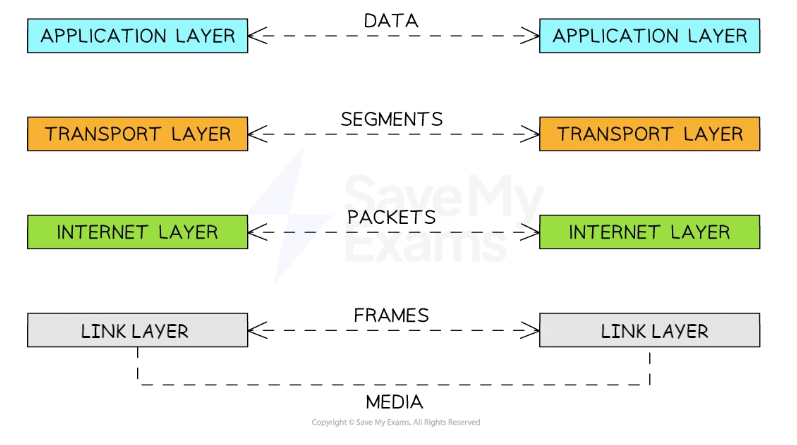
TCP/IP Diagram
Was this revision note helpful?
Build on this topic