Database models (Cambridge International AS Computer Science)
Exam board Cambridge International · ASUpdated 2026-10-01
Limitations of file-based systems
What is a file-based system?
- A file-based system refers to any system where data is stored in separate files (e.g. text files, spreadsheets)
- Each application or department may have its own files, often with redundant or duplicated data
- There is no central control or shared structure, files are often standalone
- Common in older systems or small-scale setups
Limitations
| Limitation | Explanation |
|---|---|
| Data redundancy | The same data is stored in multiple files, leading to duplication |
| Data inconsistency | If one file is updated but others aren’t, the data becomes unreliable |
| Lack of data integrity | It's harder to ensure data is accurate and consistent across all files |
| Poor security | Limited control over who can access or modify different files |
| Difficult to update | Changes must be made in several places, increasing time and risk of error |
| Limited scalability | Not suitable for large volumes of data or complex data relationships |
| No central control | Each application manages its own data, leading to lack of coordination |
| Hard to manage relationships | Cannot easily link related data across files (e.g. customers and their orders) |
Flat file vs Relational
-
A flat file database is one that stores all data in a single table
- It is simple and easy to understand but causes data redundancy, inefficient storage and is harder to maintain
-
A relational database is one that organises data into multiple tables
- It uses keys to connect related data which reduces data redundancy, makes efficient use of storage and is easier to maintain
-
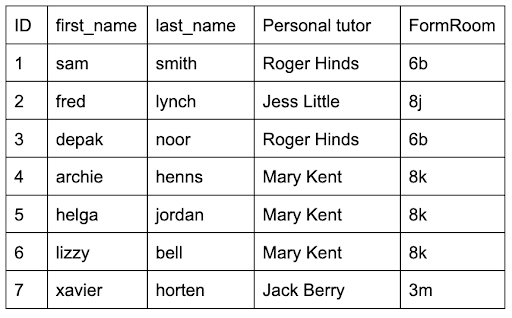
Consider this example flat file table of students
-
This table has redundant data - the tutor and form room information repeats
-
This is inefficient
-
If a tutor changed their name we would need to find all instances of that name and change them all
-
Missing any would mean the table had inconsistent data
-
A relational database would solve this issue:
- A new table could be created to store the tutor information and the tutor information in the student table could be moved to the new table
- A foreign key in the student table(
TutorID) could link a student to their tutor
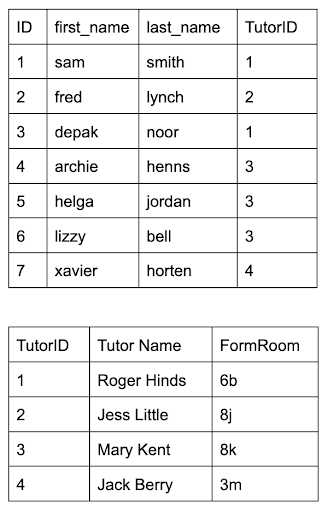
- Now the name of each tutor and their form room is stored only once
- This means if they change only one piece of data, the data is updated in the entire database and inconsistency is avoided
Database terminology
| Term | Definition |
|---|---|
| Entity | A real-world object or concept that data is stored about (e.g. Student, Book) |
| Table | A collection of data about an entity, organised in rows and columns |
| Record (Tuple) | A single row in a table representing one instance of an entity |
| Field (Attribute) | A single column in a table, storing one piece of data about the entity |
| Primary key | A unique identifier for each record in a table (e.g. StudentID) |
| Candidate key | A field (or combination of fields) that could be used as a primary key |
| Secondary key | A candidate key that has not been chosen as the primary key; an alternative key used as well as the primary key to locate specific data |
| Foreign key | A field that links to the primary key in another table to create relationships |
| Relationship | A logical connection between two tables/entities |
| One-to-One | One record in a table relates to one record in another table |
| One-to-Many | One record in a table relates to many records in another table |
| Many-to-Many | Records in one table relate to many records in another, and vice versa |
| Referential integrity | Ensures foreign keys match a primary key in the related table to prevent broken links |
| Indexing | A technique to speed up searching in a table by creating an ordered list of key fields |
Was this revision note helpful?
Build on this topic