Development Models (Cambridge International A-Level Computer Science)
Exam board Cambridge International · A-LevelUpdated 2026-10-01
Waterfall
What is the waterfall model?
- The Waterfall Model is a sequential software development process divided into distinct stages
- Each stage must be completed before the next one begins
Stages
- Analysis: The problem is investigated and the client's requirements are identified and documented, e.g. in a requirements specification
- Design: The solution is planned, e.g. algorithms, data structures and identifier tables, the user interface and the test plan
- Coding: The design is implemented in a programming language
- Testing: The program is tested against the test plan to find and correct errors
- Maintenance: After the program is in use, it is corrected, adapted or improved
- In a waterfall diagram, the downward arrows show that the result of one stage is passed to the next stage as its input
- The upward arrows show that more work is needed at a previous stage before the current stage can be completed
Benefits and drawbacks
| Benefits | Drawbacks |
|---|---|
| Simple and linear – easy to understand and follow | Inflexible – difficult to make changes once development begins |
| Clear stages and milestones – easy to track progress | Expensive to fix late problems – issues found late are harder to resolve |
| Ideal for well-defined projects – works best when requirements are fixed | Long development cycle – each stage must be completed before moving on |
Suitability
- The Waterfall Model is most suitable for projects where requirements are well understood and unlikely to change
- It works well when high quality and compliance are essential, and there is a clear understanding of the project's goals and constraints
Iterative (Agile)
What is the iterative model?
- In the iterative model the stages of the program development life cycle (analysis, design, coding and testing) are repeated several times
- Each repeat (iteration) produces a working version of the program, which is reviewed by the client
- The client's feedback is used to change or add to the requirements for the next iteration
- Each new version adds functionality to the previous one, until the client is satisfied and the final program is released and then maintained
Benefits and drawbacks
| Benefits | Drawbacks |
|---|---|
| Working software early: an early version is available long before the whole program is finished, so it can reach the market sooner | High client involvement: the client must be available to give feedback throughout the life cycle |
| Copes with change: changes to the requirements are easier and quicker to make than in the waterfall model | Hard to estimate: it is difficult to estimate the total cost and time to complete the project |
| Early feedback: problems are found and corrected early, at the end of each iteration | Changing requirements: it is easy for the client to keep changing their mind |
Suitability
- The iterative model is most suitable when the requirements are not fully known at the start or are likely to change, and the client is available to review each version
Rapid Application Development (RAD)
What is RAD?
- Rapid Application Development (RAD) is a software development methodology that emphasises fast and iterative development
Steps
- Requirement planning: Gather general system requirements, define constraints and assumptions
- User design and prototyping: Collaborate with users to develop prototypes, ensuring alignment with user needs
- Construction or iterative development: Build the system incrementally, with continuous user feedback and adaptation
- Cutover or deployment: Transition the product into the live environment, including user training, support, and documentation
- Maintenance and updates: Continue to adapt and improve the system based on user feedback and needs
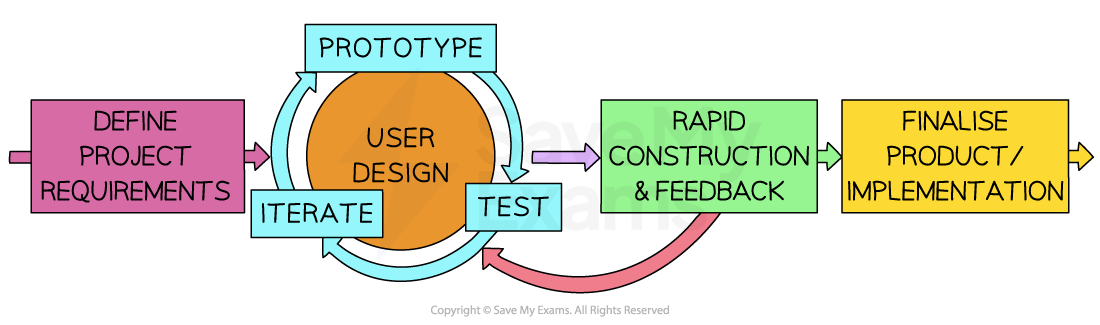
Rapid Application Development (RAD) Model of Software Development
Benefits and drawbacks
| Benefits | Drawbacks |
|---|---|
| Speed – fast development and delivery at relatively low cost | Requires strong team collaboration – skilled and cohesive teams are essential |
| User involvement – client feedback shapes the system throughout | Potential quality issues – speed may reduce testing and documentation |
| Flexibility – adapts quickly to changing requirements | Not ideal for small projects – may be too complex for simple systems |
| Incremental development – builds in small, testable parts | Scope creep risk – flexibility can lead to ever-expanding requirements |
Suitability
- Rapid Application Development is most suitable for projects where rapid delivery is required and where requirements can be developed and refined on the go
Was this revision note helpful?
Build on this topic