Locating Resources on the World Wide Web (Cambridge International A-Level Computer Science)
URL
What is a URL?
-
A Uniform Resource Locator (URL) is a unique identifier for a web page, known as the website address
-
It is text-based to make it easier to remember
-
A user enters a URL into a web browser to view a web page
-
An example of a URL is:
- https://www.savemyexams.com/a-level/computer-science/
-
A URL can typically be split into three parts:
- Protocol
- Domain name
- Web page/file name
-
Using the example about the URL would be split as follows:
| Protocol | https | Communication method to transfer data between client and server |
|---|---|---|
| Domain name | www.savemyexams.com | Name of the server where the resource is located |
| Web page/file name | /a-level/computer-science/ | Location of the file or resources on the server |
DNS
What is the Domain Name System (DNS)?
-
The DNS is like the Internet’s phone book
-
It translates domain names (like
www.google.com) into IP addresses (like142.250.180.68) -
Computers use IP addresses to find and connect to servers
-
When you type a URL into your browser:
- DNS finds the matching IP address
- Your device connects to that server to load the website
-
Without DNS, users would have to remember the IP address of every website they visit
-
When a domain is registered or its server IP address changes, the DNS must be updated
- This update is called DNS propagation, and it may take some time to spread across the internet
What happens when you type a URL into a web browser?
- The user enters a URL into the address bar of the web browser
- The browser checks its cache to see if it already knows the IP address for the website
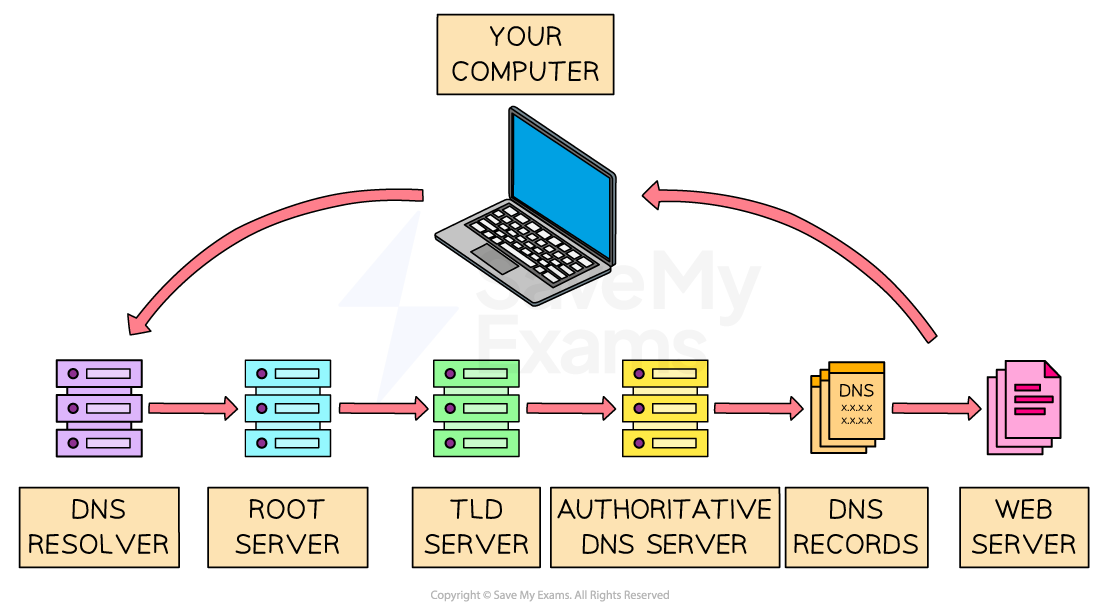
- If not found, it sends the domain name to a DNS server, which stores an index of domain names and their matching IP addresses
- If the DNS server finds the IP address, it sends it back to the web browser
- If it does not find the IP address, it passes the request on to a higher-level DNS server
- This may involve contacting:
- A root server, which points to the correct Top-Level Domain (TLD) server (e.g. .com, .org),
- The TLD server, which points to the authoritative DNS server for the domain
- The authoritative DNS server responds with the correct IP address
- The web browser then sends a request to the web server at that IP address
- The web server processes the request and sends back the website’s data (such as HTML, images, CSS, and JavaScript)
- Finally, the web browser renders the content and displays the website to the user
Worked Example Complete the following paragraph that describes the sequence of events when a user requests a page from a website.
- The user enters the Uniform Resource Locator (URL) into the address bar of the ......................................... .
- The domain name is taken from the URL and sent to a Domain Name Service (DNS). This stores .................................................. of domain names and their matching IP addresses.
- If it finds the domain name, it sends the IP address to the .................................................. .
- If it does not find the domain name, it sends the request to ..................................................
Final answer: Answer
- Web browser [1 mark]
- An index/a list/a table [1 mark]
- Web browser [1 mark]
- A higher-level DNS [1 mark]
Was this revision note helpful?
Build on this topic