System Software & Application Software (Edexcel IGCSE Ict)
Purpose of application & system software
Spec point —
1.3.1
What is software?
-
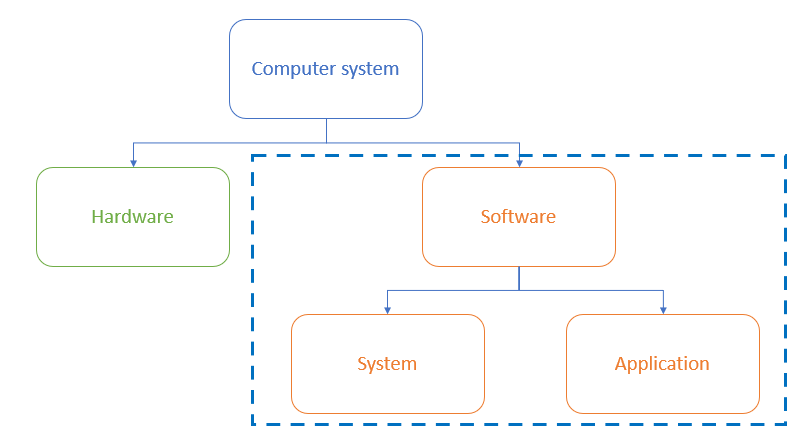
Software is the set of programs that control the hardware; they live on the computer system but cannot be physically touched
-
Software can be broken down in to two categories:
- Application software
- System software
What is application software?
-
Application software (abbreviated 'apps') is software chosen by a user to help them carry out a specific task
-
Application software is installed on top of system software and is user-chosen to best suit industry requirements
-
Common categories of application software include:
- Word processing: creating and editing text documents
- Spreadsheet: organising and analysing data in a grid format
- Database management systems: storing, retrieving and managing data in databases
- Control/measurement: uses sensors to measure and control a system
- Video editing: creating and modifying video files
- Graphics editing: creating and modifying images
- Audio editing: creating and modifying sound files
- Computer-Aided Design (CAD): designing and modelling objects in 2D or 3D
Exam Hint When writing about application software, ensure you refer to it by its type and not a brand name. For example, 'word processing' and not Microsoft Word
What is system software?
-
System software is software essential for the operation of a computer system
-
Without system software, a user has no starting point for giving a computer instructions
-
System software gives users a platform to run applications and carry out tasks
-
Essential services carried out by system software include:
- Compilers: translating high-level programming languages into machine code
- Linkers: combining object files into a single executable program
- Device drivers: controlling hardware components and peripherals
- Operating systems: managing the computer's resources and providing a user interface
- Utilities: tools for maintaining and optimising the computer's performance
Utility software
Spec point —
1.3.1
What is utility software?
- Utility software is software designed to help maintain, **enhance **and troubleshoot/repair a computer system
- Utility software is designed to perform a limited number of tasks
- Utility software** interacts with the computers hardware**, for example, secondary storage devices
- Some utility software comes installed with the operating system
- Examples of utility software and their function are:
Defragmentation (maintain)
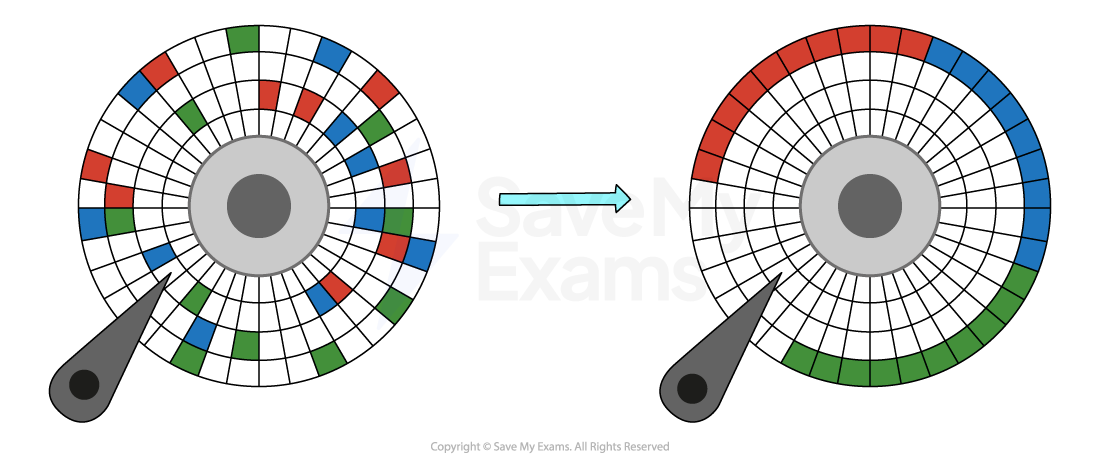
- Defragmentation software groups fragmented files back together in order to improve access speed
- As programs and data are added to a new hard disk drive, it is added in order,over time as files are deleted this leaves gaps
- As programs and data are added over time, these gaps get filled and data becomes fragmented
- Defragmentation can only used on magnetic storage
Exam Hint If the concept of defragmentation still seems a little difficult then hopefully this analogy will help
- In a tidy bedroom you can find your things faster because they are in the right place (in order)
- Over time you move things, forget to put them back and/or add new things
- The time taken to find your things increases, until...
- You tidy your room and finding things becomes quicker again (defragmentation!)
Compression (enhance)
- Compression reduces the amount of secondary storage required by performing an algorithm on the original data
- Lossy compression physically removes data from the original data to reduce its size, the original file can not be re-created
- Lossless compression uses mathematics to order data more efficiently reducing its size, the original files can be re-created as no data is lost
Encryption (enhance)
- Encryption is the process of scrambling data using an algorithm from plain-text into cipher-text in order to make it unreadable to users without the master key
- Encryption software enhances the security of the computer system and keeps data safe
Task manager (troubleshoot/repair)
-
Task manager is software that is built into the operating system to allow users to monitor system resources in order to help troubleshoot potential problems
-
Task manager gives system information such as:
- Processes
- Performance
- App history
- Start-up apps
- Users
- Services
Worked Example Describe how utility software can reduce access times for large files stored on magnetic media
[2]
Answer
- By defragmenting file data [1]...
- ...that has been allocated randomly to free space [1]
- By placing file data in adjacent sectors [1]...
- ...to reduce the need to spin the disc / seek across the platter surface [1]
Was this revision note helpful?
Build on this topic