HTML (Edexcel IGCSE Ict)
What is HTML?
- Hypertext Markup Language (HTML), is the foundational language used to structure content on the web
- HTML consists of a series of elements, often referred to as "tags," which can be used to structure and format a webpage
- The
<html>tag is the root element of an HTML page - The tag includes all other HTML elements used on the page
- Most tags are opened and closed e.g.
<html>and</html>whereas some tags are only opened e.g.<img>and<link> - The content layer of a web page is made up of HTML elements such as headings (
<h1>, <h2>, etc.), paragraphs (<p>), links (<a>), images (<img>), and more
Head
Spec point —
6.4.4
What is the head section of a webpage?
-
The head section contains information about the web page that's not displayed on the page itself
- It's enclosed by
<head>and</head>tags - The content inside the head tag is displayed in the browser tab
- It's enclosed by
Page title
- The
<title>element is used to set the page title that displays in the browser tab - It is placed inside the
<head>section of the HTML document
External stylesheets
- External stylesheets are linked in the
<head>section using the<link>element - The
relattribute is set to "stylesheet", and thehrefattribute contains the relative file path to the CSS file - Stylesheets are loaded in the order they are listed, so hierarchy is important
Adding a page title and link to an external stylesheet in HTML
Metatags
-
Metatags are snippets of text in HTML that describe a page's content
-
They don't appear on the page itself but in the page's code
-
Search engines, browsers and other web services use metatags to glean information about a web page
-
Metatags provide additional information about the web page to the browser and search engines
-
Examples of metatags include:
-
Charset
- The
<meta charset="UTF-8">tag specifies the character encoding for the HTML document - UTF-8 is the most common character encoding and includes almost all characters from all writing systems
- The
-
Keywords
- The
keywordsattribute in a<meta>tag is a comma-separated list of words that represent the content of the web page - It was originally intended to help search engines understand the content of a page, but it's less relevant today as search engines have become more sophisticated
- The
-
Author
- The
authorattribute in a<meta>the tag identifies the author of the web page - It can be helpful for copyright purposes and for readers who want to know the source of the content
- The
-
Description
- The
descriptionattribute in a<meta>tag provides a concise explanation of the content of the web page - This description often appears in search engine results and can influence click-through rates
- The
-
Adding basic metatags in HTML
-
Viewport
- The
<meta name="viewport" content="width=device-width, initial-scale=1">tag makes your web page display correctly on all devices (desktop, tablet, mobile) - It controls the viewport siz e and the initial zoom level
- The
Adding a viewpoint metatag in HTML
Default target windows
- The
targetattribute of the<base>element can set a default target window for all links on a page - For example,
<base target="_blank">will open all links in a new window or tab
Adding the base target metatag in HTML
Body
Spec point —
6.4.4
What is the body section of a webpage?
-
The body section contains the main content of the web page, such as text, images, videos, hyperlinks, tables etc.
- It's enclosed by
<body>and</body>tags - The content inside the body tag is displayed in the browser window
- It's enclosed by
-
Text entry (headings & paragraphs)
Adding text to the body of a HTML page
- Inserting an image
Adding an image in HTML
Tables in webpages
- In the early days of web development, tables were used to create complex page layouts
- They provide a way to arrange data into rows and columns
- By utilising cell padding, cell spacing, and borders, developers could **manipulate the appearance **of the page
- Today, tables are primarily used for** displaying tabular data** - information that is logically displayed in grid format
- For example, financial data, timetables, comparison charts and statistical data are often presented in tables
- Tables make it easy for users to scan, analyse and comprehend the data
- Tables also enhance accessibility
- Screen readers for visually impaired users can read tables effectively if they are correctly structured
- HTML elements like
<table>,<tr>,<th>, and<td>help in conveying the structure and purpose of the data to these assistive technologies
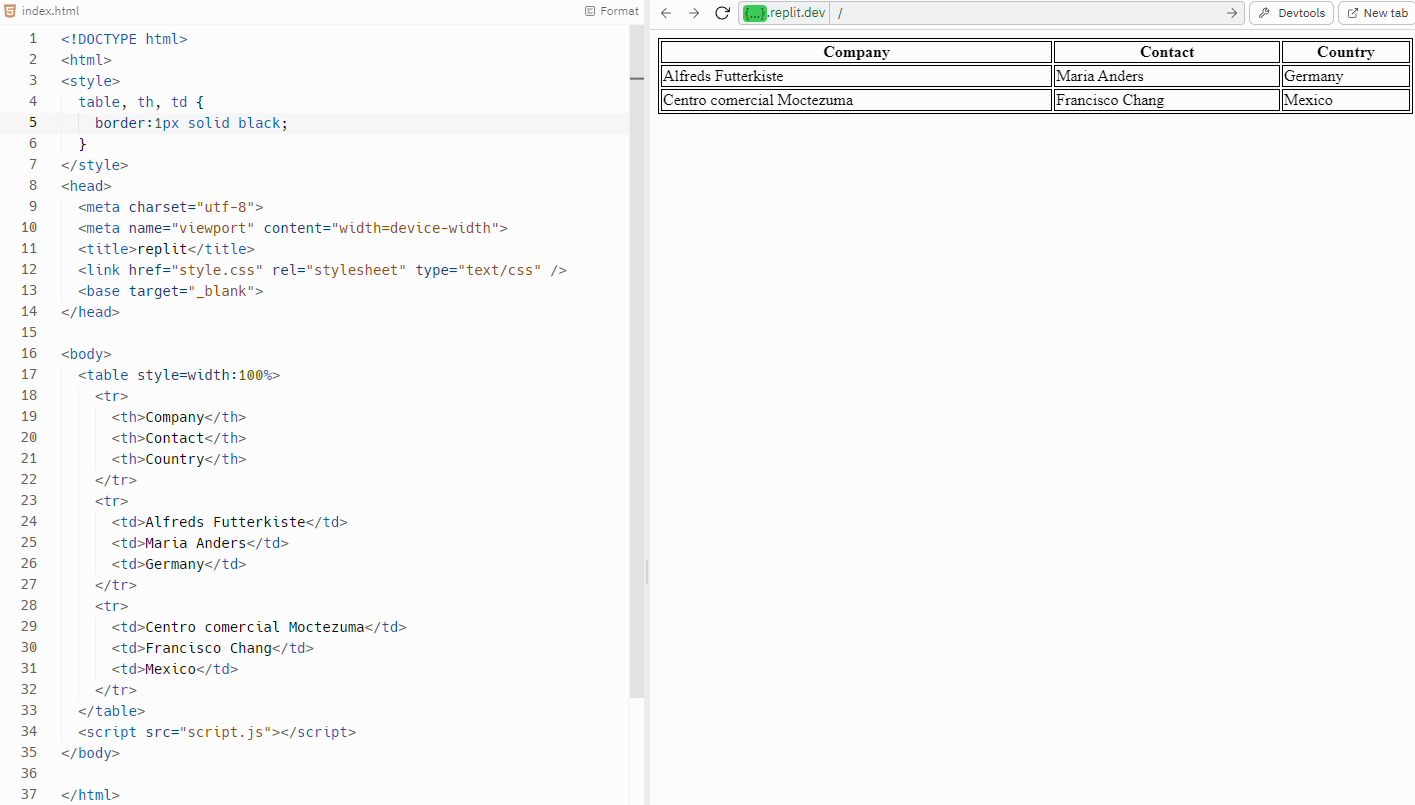
Creating a table using HTML
Hyperlinks
Spec point —
6.4.4
What is a hyperlink?
-
A hyperlink, often just called a 'link', is a reference to data that a reader can directly follow by clicking or tapping
-
It is one of the core elements of the World Wide Web, as it enables navigation from one web page or section to another
-
Hyperlinks are created using the
<a>(anchor) tag in HTML -
They can link to different sections of the same page, other locally stored web pages, or external websites
- Text hyperlinks: Usually, a portion of text that is highlighted in some way, like being underlined or a different colour
- Image hyperlinks: An image that you can click on to take you to another page or another part of the same page
- Button hyperlinks: A clickable button that redirects the user to another page or section
-
Hyperlinks utilise the '
href' attribute within the<a>tag in HTML -
The '
href' attribute contains the URL of the page to which the link leads -
The text between the opening
<a>and closing</a>tags are the part that will appear as a link on the page
Hyperlink types
-
Same-page bookmark: Use the
#followed by theidof the element you want to jump to- Example:
<a href="#section1">Go to Section 1</a>
- Example:
-
Locally stored web page: Use the relative path to the file
- Example:
<a href="contact.html">Contact Us</a>
- Example:
-
External website: Use the full URL
- Example:
<a href="https://www.google.com">Google</a>
- Example:
-
Email link: Use
mailto:followed by the email address- Example:
<a href="mailto:example@example.com">Email Us</a>
- Example:
-
Specified location: Use the
targetattribute to specify where to open the link-
_blankfor a new tab or window -
_selffor the same tab or window, or a named window- Example:
<a href="https://www.google.com" target="_blank">Google</a>
- Example:
-
Example body section containing hyperlinks
Was this revision note helpful?
Build on this topic