General Algorithms (Edexcel IAL Maths)
Introduction to Algorithms
Spec point —
1.1
What is an algorithm?
-
An algorithm is a set of precise instructions that, if strictly followed, will result in the solution to a problem
-
Algorithms are particularly useful for programming computers
- Computers can process huge amounts of data and perform millions of calculations in very short time frames
-
Robots can be programmed to follow an algorithm in order to complete a task
- E.g. A robot vacuum cleaner or lawn mower
-
Algorithms can be performed by human beings too!
- E.g. The recipe and cooking instructions for a cake
-
What does an algorithm look like?
-
Algorithms may be presented in a variety of ways
-
A list of instructions, in order, written in words
-
Flow charts are a visual way of presenting the steps of an algorithm
- These clearly show the order of instructions and any parts of an algorithm that may need repetition
-
What else do I need to know about algorithms?
-
Some algorithms do not always provide an optimal (best) solution
- However, they will give a solution that is sufficient for the purpose
-
Modern real-life situations can be complex to analyse
-
A compromise between the efficiency of an algorithm and its accuracy is often required
-
E.g. An algorithm may produce a 'shortest route' result that is inaccurate by 200 miles
- For a very long journey, the time saved using this algorithm may be more important than this inaccuracy
-
-
When using an algorithm with a small amount of data in an exam you must follow the algorithm precisely and accurately
- This demonstrates understanding of the algorithm
- Using common sense or intuition to 'see' the solution will not gain full marks
Exam Hint
You must show that you have followed an algorithm precisely
Use checks built into the algorithm to know that an algorithm is complete
State (or 'print') any 'output' at the end if that is what an algorithm instruction requires
- Do not assume the output is the last number in your working
Flow Charts
Spec point —
1.1
What is a flow chart?
-
A flow chart is a diagrammatic way of listing the instructions to an algorithm
-
Flow charts lend themselves to algorithms that have
-
conditional instructions
- E.g. Is ?
- If the answer is yes, the flow chart directs the user to one instruction
- If the answer is no, the flow chart directs the user to a different instruction
-
repetitive parts or stages
-
What do the different shaped boxes in a flow chart mean?
-
Each command in a flow chart is written inside a shape
-
The shape will depend on the type of command
- Ovals are used to represent the start and the end
- Rectangles are used to represent instructions
- Diamonds are used to represent questions
-

How do I work with a flow chart?
-
Following a flow chart is generally straightforward but make sure you follow the instructions carefully
-
Commands given in a flow chart are intuitive to follow
-
Examples include
- 'Input ...' - The value(s)/data that the algorithm needs to be told
- 'Let ...' - Assign or update a value for a variable
- 'If ...' - A conditional statement, the outcome of which will lead to different parts of the algorithm
- 'Output...' or 'Print ...' - Write down the answer
-
-
Write down any values when instructed to
-
This will often involve completing a table of values
-
Sometimes there is a specific instruction to 'output' the final answer
- Make sure the answer is separate to the table
-
-
Some questions may ask for a description of what the flow chart/algorithm produces
Exam Hint
If a question provides a table that is to be filled in with values that change, bear in mind that some values may not change
In such instances, only the first entry for a value may end up being entered
- Not every cell in every row/column will necessarily need completing
- Follow the instructions from the flow chart ('robot mode'!)
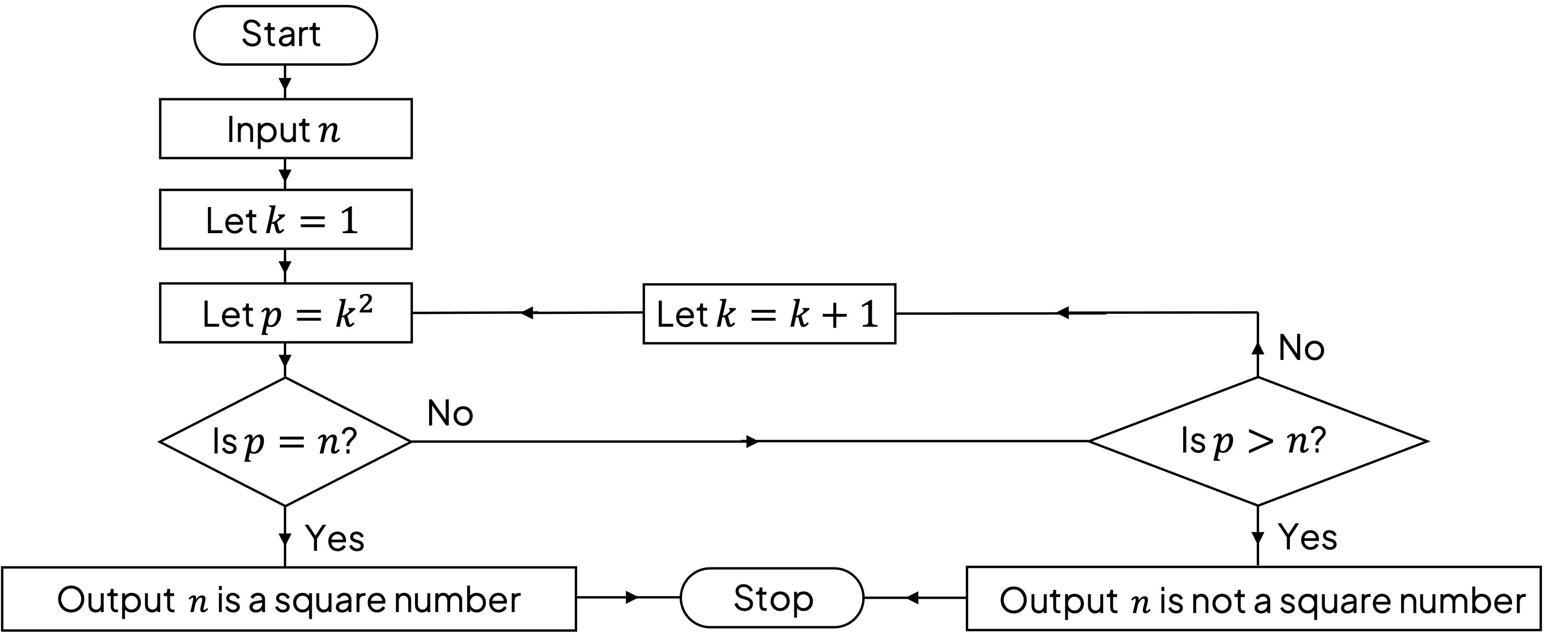
Worked Example An algorithm is presented as a flow chart, shown below.
a) Describe what the algorithm achieves.
Answer:
The final instructions often give an idea of the purpose of an algorithm
The algorithm works out if the input valueis a square number or not
b) For the input , use the flow chart to perform the algorithm. Complete the table.
Is ? Is ? Output: The first instruction is to input , so fill 23 under in the first row of the table The next two instructions are to let and to let , so also in the first row we can fill in 1 and 1 for and * *
Is ? Is ? 23 1 1 The next instruction is the first question, is ; the answer is no For the answer no, the flow chart directs us to another question, is ; the answer is no and so we can complete the top row of the table
Is ? Is ? 23 1 1 NO NO The flow chart now updates the value of ; indicate this on the second row of the table The flow chart then takes us back round the loop of finding and testing the value of does not get updated so only appears in the first row of the table
Is ? Is ? 23 1 1 NO NO 2 4 NO NO The table can be completed by continuing to precisely follow the flow chart The output needs stating at the end as per the flow chart instructions In the row "is ?" still has a 'no' answer, but the 'yes' answer to the question "is ?" means that the algorithm gives its output and stops
Is ? Is ? 23 1 1 NO NO 2 4 NO NO 3 9 NO NO 4 16 NO NO 5 25 NO YES Output: Final answer: 23 is not a square number
Text-Based Algorithms
Spec point —
1.1
What are text-based algorithms?
-
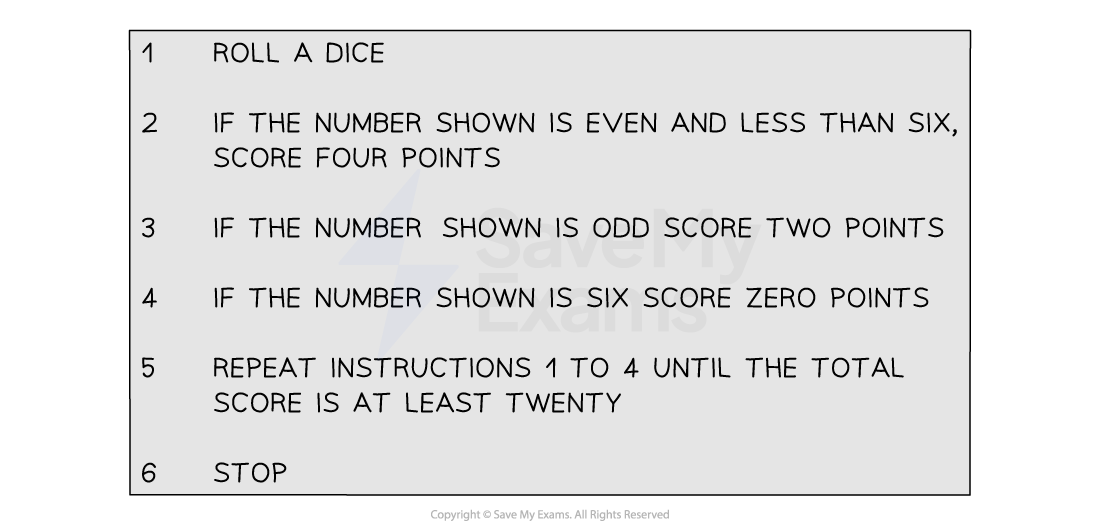
Text-based algorithms refer to instructions that are given in sentences
- Each instruction may be labelled with 1, 2, 3, and so on
-
The following text-based algorithm is for a very basic single player dice game
- The aim of the game is to minimise the number of rolls of the dice needed to reach 'Stop'
Was this revision note helpful?
Build on this topic