Hardware devices (Cambridge International AS Computer Science)
Exam board Cambridge International · ASUpdated 2025-08-04
Input devices
| Device | Principal operations | Additional information |
|---|---|---|
| Microphone | - Converts sound waves into electrical signals | - Allows users to record voice or send audio into a computer - Dynamic microphones – good for loud environments (e.g. concerts) - Condenser microphones – more sensitive and accurate, used in studios |
| Touchscreen | - Detects a user's touch and converts it into an input command | - Capacitive – responds to electrical charge from your finger (used in smartphones, tablets) - Resistive – responds to pressure (used in ATMs, tills) - First used in ATMs and information kiosks, now used in smartphones, tablets, laptops, smart displays - Popular for direct, easy interaction and improved accessibility |
Output devices
| Device | Principal operations | Additional information |
|---|---|---|
| Laser printer | - Laser beam draws the image of the page onto a photosensitive drum, changing its electric charge - Toner is transferred from drum to paper | - Toner sticks to the drum – toner powder is attracted to charged areas matching text/image shape - Fusing – paper passes through hot rollers, melting toner onto paper so it doesn't smudge |
| 3D printer | - Builds objects layer by layer from the bottom up - Uses various materials such as thermoplastics, resins, and metals - Allows high customisation and rapid prototyping | - Handles complex shapes traditional methods can’t make easily - FDM – melts plastic and builds in layers, SLA – uses light to harden liquid resin - Used in healthcare (prosthetics), automotive/aerospace (custom parts) - Can be slow for large/detailed objects, some methods need costly specialist materials |
| Speakers | - Convert electrical signals into sound waves | - Range from basic laptop speakers to high-end multi-driver home theatre systems - Found in phones, laptops, studios, smart devices, home theatres - Improved with digital sound processing and miniaturised components - Support voice commands, calls, and multimedia playback |
| Virtual reality headset | - Creates a fully immersive 360° digital environment - Lets users look around and interact with the virtual world | - Uses head tracking, motion sensors, and stereoscopic displays for 3D vision - Uses – gaming, education/training, architecture/design, medical/therapy - Challenges – expensive hardware, possible eye strain or motion sickness, time-intensive content creation |
Storage devices
| Device | Principal operations | Additional information |
|---|---|---|
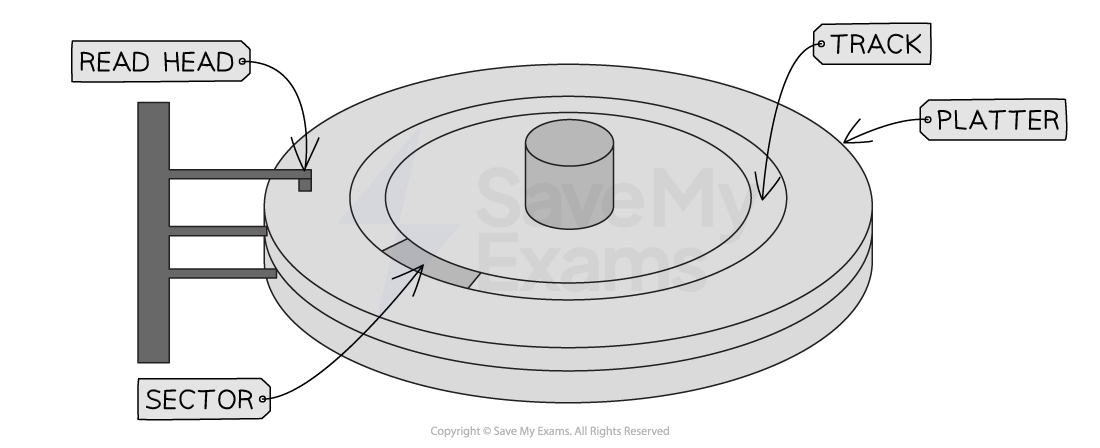
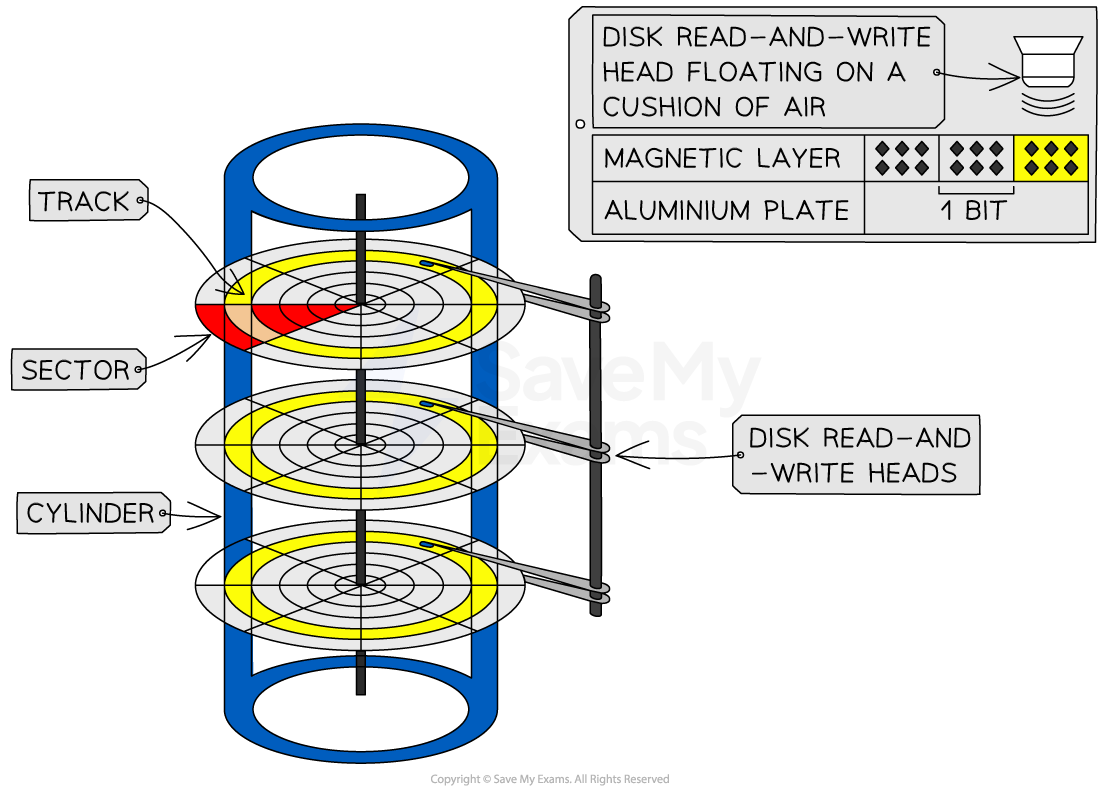
| Magnetic hard disk | - Multiple metal platters coated with magnetic material store data as magnetised iron particles (0s and 1s) - Platters spin at high speed (typically 5400–7200 RPM) - Data read/written using electromagnets | - Platters divided into concentric tracks and wedge-shaped sectors, forming track sectors - Read/write arm, controlled by an actuator, positions the head over the correct track sector - Reliable but mechanical – can be slower and more prone to damage than SSDs |
  | ||
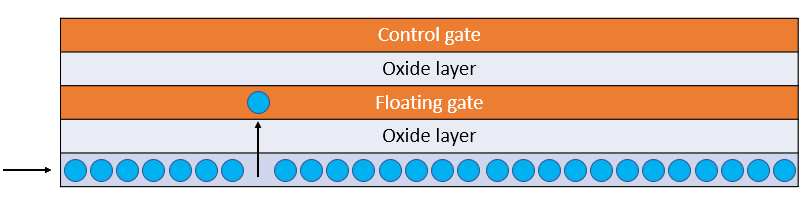
| Solid state (flash) memory | - Stores data in cells using transistors that act as switches - Uses NAND or NOR gates to control flow of electrons - Writing: high voltage pushes electrons onto floating gate - Faster and more durable than magnetic drives | - Common examples: SSDs, USB flash drives - Each cell contains a control gate (controls current) and a floating gate (stores charge) - Erasing: reverse high voltage pulls electrons off floating gate - No moving parts – better shock resistance |
 | ||
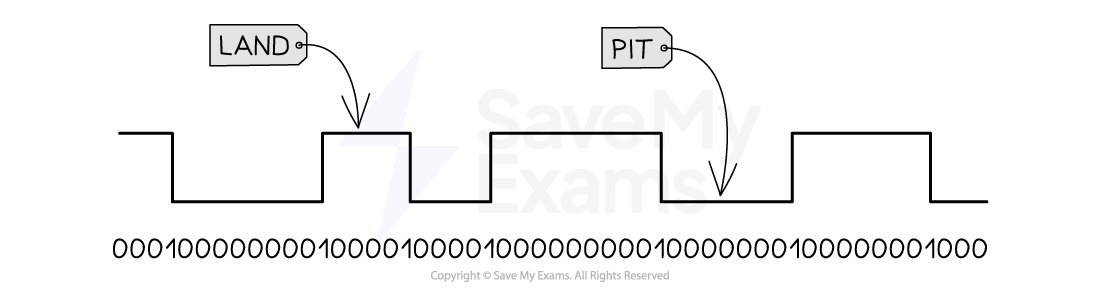
| Optical disc reader/writer | - Uses a laser to read and/or write data on optical discs - Writing: laser burns pits and lands onto the disc surface - Arm moves the laser across the disc - Blu-rays store the most, CDs the least | - Examples: CD, DVD, Blu-ray - Reading: laser scans surface; changes in reflection indicate 0s and 1s - CD-R = write once, CD-RW/DVD-RW = rewriteable - Slower than magnetic/solid-state storage but good for archival |
 |
Worked Example A magnetic hard disk is used to store data on the computer. Describe the principal operations of a magnetic hard disk [5]
Final answer: Answer
- The hard disk has (one or more) platter/plate/disk [1 mark]
- Each surface of the platter/disk is capable of being magnetised [1 mark]
- The surface of the platter/disk is divided into concentric tracks / circles [1 mark]
- The disks are rotated (at high-speed) [1 mark]
- (Each surface of the disk) has a read/write head mounted on an arm (positioned just above the surface) [1 mark]
Was this revision note helpful?
Build on this topic