IP addressing (Cambridge International AS Computer Science)
IP addressing
What is an IP address?
- An IP (Internet Protocol) address is a unique identifier given to devices which communicate over the Internet (WAN)
- IP addresses are dynamic, they can change
- IP addresses make it possible to deliver data to the right device
- A device connecting to a network will be given an IP address, if it moves to a different network then the IP address will change
IPv4
- Internet Protocol version 4 is represented as 4 blocks of denary numbers between 0 and 255, separated by full stops
- Each block is one byte (8 bits), each address is 4 bytes (32 bits)
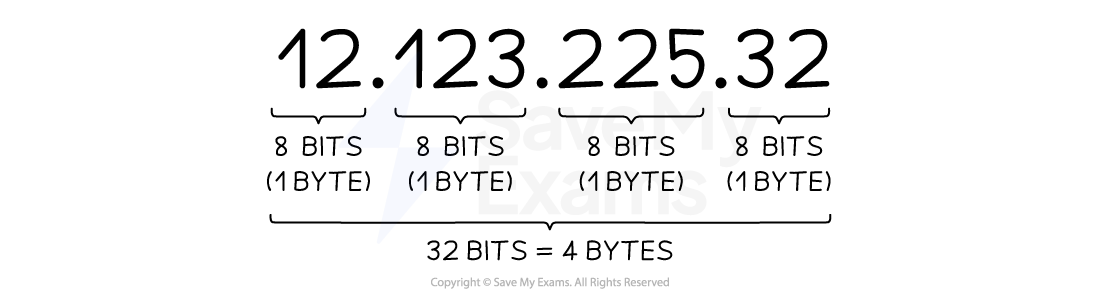
- IPv4 provides over 4 billion unique addresses(232), however, with over 7 billion people and countless devices per person, a solution was needed
IPv6
- Internet Protocol version 6 is represented as 8 blocks of 4 hexadecimal digits, separated by colons
- Each block is 2 bytes (16 bits), each address is 16 bytes (128 bits)
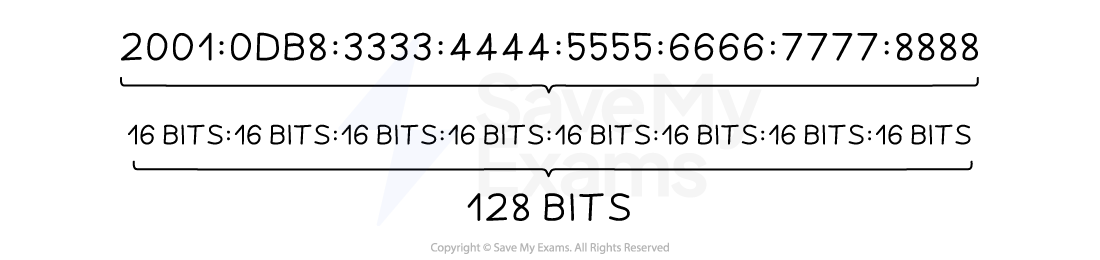
- IPv6 could provide over one billion unique addresses for every person on the planet (2128)
Subnetting
-
Subnetting is the process of dividing a larger network into smaller, more manageable parts, called subnets (short for sub-networks)
-
Each subnet works like a mini-network within the main network, allowing devices to communicate more efficiently
-
Benefits of subnetting include:
- Reduces network traffic – less data is broadcast across the whole network
- Improves speed and performance – data stays within its local subnet
- Increases security – limits access so not all devices can reach all parts of the network
- Easier to manage and maintain – changes can be made to one subnet without affecting the rest
- Improves organisation – helps group devices by department or function
-
It's commonly used in larger networks, like schools or businesses, to reduce traffic, keep data local, and make management easier
Public vs private IP addresses
-
Public IP addresses are assigned to devices that need a constant connection to the internet
-
Examples:
- Web servers
- Email servers
-
Globally unique – no two devices can have the same public IP
-
Allows devices to be directly accessed from anywhere on the internet
-
Private IP addresses are assigned to devices on a Local Area Network (LAN) by a router
-
Not routable on the internet – improves network security
-
Used for items in a home or office, such as:
- Laptops
- Phones
- Printers
-
Allows internal communication without exposing devices to the public internet
Static vs dynamic IP addresses
-
Static IP addresses are fixed IP addresses that do not change
-
Assigned to devices that need a consistent address Commonly used for:
- Websites
- Remote access services
- Email or file servers
-
No management required once set
-
Allows reliable access from anywhere on the network or internet
-
Dynamic IP addresses are temporarily assigned when a device connects to the network
-
Comes from a pool of available IP addresses
-
Managed automatically by a DHCP server (Dynamic Host Configuration Protocol)
-
Ideal for devices where a fixed address isn't needed
- e.g. laptops, smartphones, or guest devices
Worked Example Computers on the Internet have IP addresses.
Describe the format of an IP address. [3]
Final answer: Answer
**IPv4 **
- Four groups of denary or hexadecimal digits** [1 mark]**
- Numbers between 0 and 255 / 0 and FF [1 mark]
- Each is stored in 1 byte / 8 bits [1 mark]
- The whole number is stored in 32 bits / 4 bytes [1 mark]
- Separated by full stops [1 mark]
- Correct example [1 mark]
OR
**IPv6 **
- Eight groups of (Hexadecimal) digits** [1 mark]**
- Numbers between 0 and FFFF [1 mark]
- Each is stored in 2 bytes/16 bits [1 mark]
- The whole number is stored in 128 bits / 16 bytes [1 mark]
- Separated by colons [1 mark]
- The first instance of multiple groups of zero can be replaced by a double colon [1 mark]
- Correct example [1 mark]
Was this revision note helpful?
Build on this topic